Chrome autofill pulls form details from Gmail for US users
Chrome's enhanced autofill began rolling out in the United States on 28 October 2026, suggesting order numbers, tracking details and flight bookings pulled from Gmail for Gemini users with Personal Intelligence enabled.
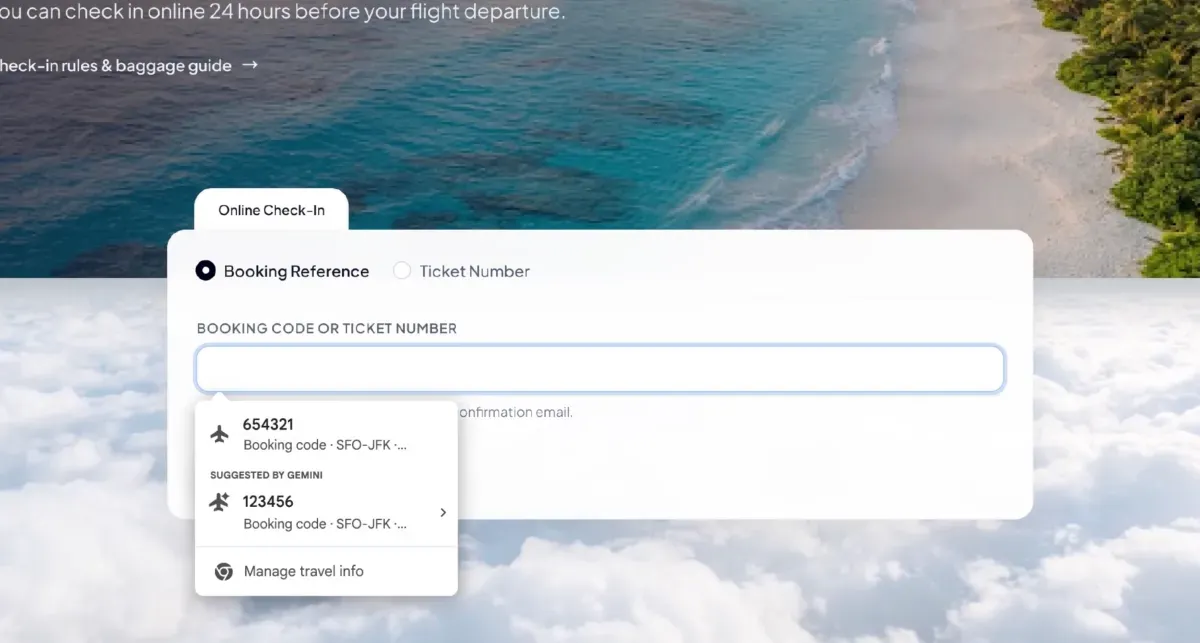 Photo: TechCrunch
Key points
Chrome's enhanced autofill began rolling out in the US on 28 October 2026 to suggest form details pulled from Gmail.
Chrome's enhanced autofill began rolling out in the United States on 28 October 2026, suggesting details pulled directly from Gmail as people fill out online forms. The feature, powered by Gemini with Personal Intelligence, surfaces order numbers, tracking information and flight bookings at the moment they are needed, Google's product manager Amanda Lim said in a blog post published the same day.
The change matters because it moves autofill beyond the basics a browser has long stored, such as a name, address and credit card number, and into the contents of a person's inbox. Instead of switching tabs to hunt for a confirmation email or a receipt, a user sees the relevant detail offered as a suggestion while completing the form.
What the update adds to forms
The expanded capabilities can retrieve a shipment's tracking number, travel details such as a flight booking number or hotel reservation, and the order number of a recent purchase, according to Google's announcement. The suggestions appear while a person completes a form, drawing on the contents of their Gmail inbox rather than stored profile data.
The feature is an expansion of Google's Personal Intelligence, which lets users connect their Google Apps to the Gemini AI assistant so it can retrieve certain details and use them to answer complex questions. Enhanced autofill last year already drew on Google Accounts and services such as Google Wallet to suggest a name, passport number, email address and physical addresses.
Users decide whether to turn on enhanced autofill through their Chrome settings, and can manage what it has access to or switch it off completely. Sensitive data presented as a suggestion while completing a form remains encrypted, Google says. The rollout covers the desktop version of Chrome and the Android and iOS apps, for Gemini in Chrome users with Personal Intelligence enabled.
How the feature is controlled
Google is starting the rollout in the US only, The Verge and Google's blog both state, and it applies to users who have Personal Intelligence turned on. The capability runs through Gemini in Chrome, so a person who has not enabled that assistant setting will not see Gmail-sourced suggestions offered while filling out forms.
Google says it plans to extend the same capability so that enhanced autofill can securely access information from images stored in a user's Google Photos library. That step has not shipped; the blog post describes it as coming soon, without giving a date for when photo-sourced suggestions would begin appearing in forms.
The update echoes a feature Apple users have long had: automatically detecting verification codes sent by text and displaying them above the keyboard so they can be entered with a single tap. The Gmail-sourced suggestions serve a similar convenience purpose, though they draw on email content rather than incoming text messages.
For Google, the change extends autofill to the scattered confirmations and receipts that otherwise require a search through an inbox, Google's blog post says. Autofill has long handled the basics — name, address and credit card number — and now reaches into message content to offer the right detail at the right moment.
No date has been given for a rollout beyond the United States, and Google's announcement does not say when the Google Photos extension will arrive. The feature is live now in the US for Gemini in Chrome users with Personal Intelligence enabled, on desktop, Android and iOS, with access managed through Chrome settings.
Frequently asked questions
What did Chrome's autofill update do?
Chrome's enhanced autofill began rolling out in the US on 28 October 2026, suggesting details pulled from Gmail — such as order numbers, tracking information and flight bookings — as a user fills out an online form.
Who can use the Gmail-powered autofill?
It is available in the US, on desktop, Android and iOS, for Gemini in Chrome users with Personal Intelligence enabled. Users can turn it on or off and manage its access through Chrome settings.
Is the data from Gmail kept secure?
Google says sensitive data presented as a suggestion while completing a form remains encrypted, and users remain in control of whether enhanced autofill is enabled and what it can access.