Firefox Smart Window fills forms from open tabs in US beta
On 27 October 2026 Mozilla launched Smart Window form filling and page watching in the US and Canada beta, using Gemini 3.1 Flash Lite to draft answers from chosen tabs.
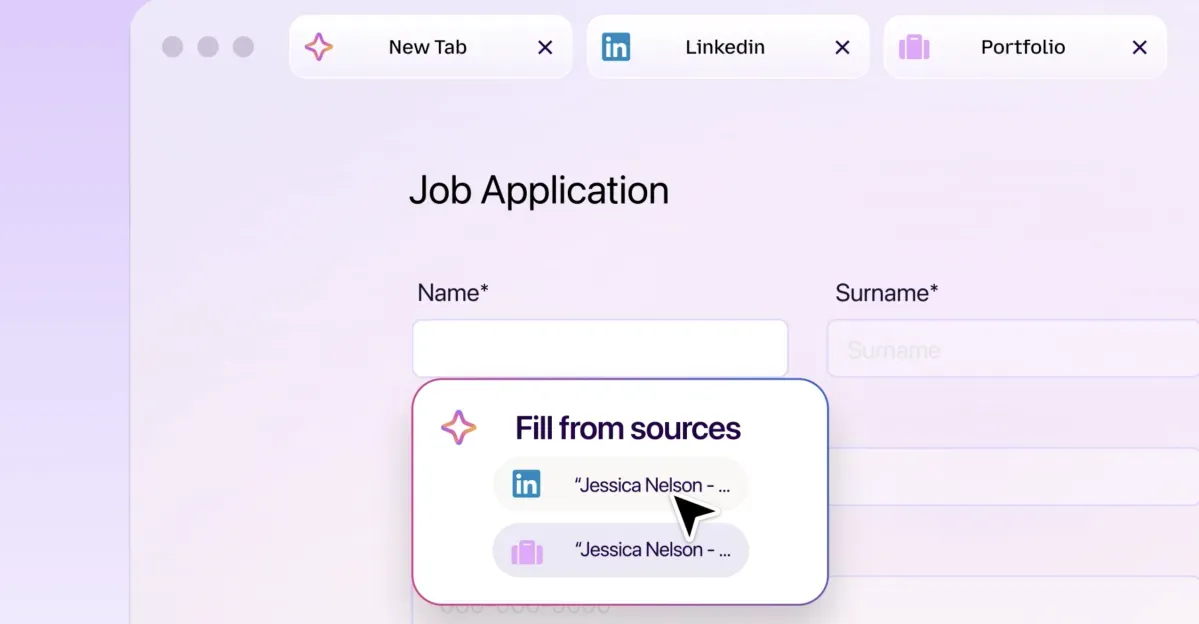 Photo: The Verge
Key points
On 27 October 2026 Mozilla launched Smart Window form filling and page watching in the US and Canada beta.
Mozilla launched two new Smart Window features in Firefox on 27 October 2026: AI-powered form filling that draws on open tabs, and page watching that alerts users to specific changes. Both features are available in the Smart Window beta on desktop, in English, for users in the US and Canada, with other markets to follow in the coming months.
The features matter because they move Firefox's AI assistant from answering questions to taking actions inside web forms and monitoring pages over time. Smart Window, formerly announced as AI Window nearly a year ago and since renamed, has gradually added capabilities including AI-powered web search, automatic tab grouping, duplicate tab detection, and natural-language browsing history search.
What the two features do
Form filling activates when a user clicks into a form with at least four text fields. A "Fill from sources" option appears, showing which tabs Firefox will draw from. Users can select or deselect tabs, then review and edit generated suggestions before submitting. Mozilla notes Smart Window will not submit the form on the user's behalf.
Firefox's regular autofill still handles saved information such as names and addresses, entered directly without relying on AI models. The new feature goes beyond this by generating responses from information on other open pages, such as pulling work history from an online portfolio or professional profile to fill a job application, or drafting an answer to a question like "Tell me about a time when…"
When a user chooses form filling, information from selected source pages is shared with Gemini 3.1 Flash Lite, the model that detects fields and extracts relevant information from tabs. The user's model choice for Smart Window chat stays the same, and saved autofill values stay on the device. Generated form fill data is not saved.
How the AI models work
The second feature lets users type "/watch" in the Smart Window chat to monitor pages for specific changes such as sales, new job listings, price drops, or product availability. Each task can follow up to five pages, with up to 15 active tasks at a time, checked daily or weekly only while Firefox is open. Page monitoring uses the Qwen AI model to identify matching changes.
When a match is found, Firefox notifies the user through the Tasks button in the toolbar, or directly via desktop notifications if enabled. Tasks can be edited, paused, or deleted. Smart Window automatically pauses tasks after 60 days without a matching change, and stops checking altogether after 90 days without a change.
Form filling currently supports only text fields on web forms. Mozilla says it is exploring support for dropdown menus, PDF forms, and ways to save and manage generated information for future forms. Both features are limited to English-language users in the US and Canada, and Mozilla says they will roll out to additional markets in the coming months.
Frequently asked questions
How does Firefox Smart Window's AI form filling work?
Click into a form with at least four text fields, select "Fill from sources," choose which open tabs to draw from, then review and edit the generated suggestions before submitting. Information from selected tabs is shared with Gemini 3.1 Flash Lite.
Where is the Firefox Smart Window form filling feature available?
Both new features are available in the Smart Window beta on desktop, in English, for users in the US and Canada, with other markets planned for the coming months.
How does page watching in Firefox Smart Window work?
Type "/watch" in the Smart Window chat, describe what you're looking for, add up to five pages, and choose daily or weekly checks. Firefox uses the Qwen model to detect matching changes and notifies you via the Tasks button or desktop notifications.