Apple adds privacy controls for AI apps in macOS 27.3
Apple's macOS 27.3 beta splits Device Control and Data Access, adds per-request permissions, and warns users about Full Disk Access risks.
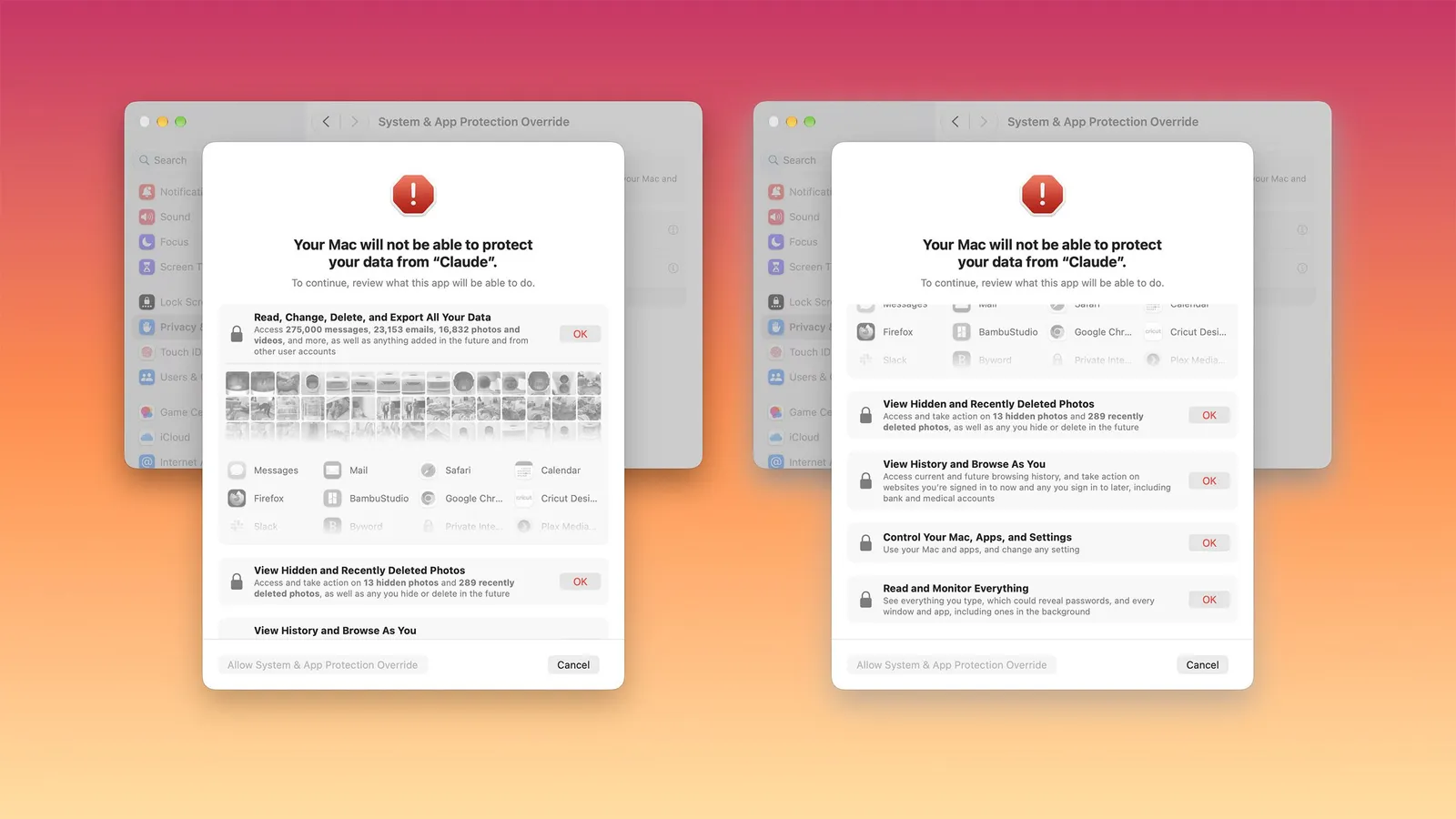 Photo: MacRumors
Key points
Apple's macOS 27.3 beta adds new privacy controls for AI apps, including split permissions, per-request access, and clearer warnings.
Apple on Monday introduced new privacy controls for AI apps in the macOS 27.3 beta, splitting the Device Control and Data Access setting into two clearer options and adding warnings about Full Disk Access. The changes, announced to developers, aim to address risks posed by AI agents that can take actions across a user's device. Apple said the current setting becomes System & App Protection Override and Accessibility, making it clearer what users are permitting.
The update comes after Apple said last month it would add "additional controls" for Full Disk Access because of risks from AI agents. Apple warned that some developers use Full Disk Access in ways that can expose files, mail, messages, browsing history, and more. The company said it would "introduce additional controls to ensure that users who genuinely wish to grant an app this extraordinary level of access can only do so with very explicit user action."
What the filing changes
In macOS 27.3, users will see a single method for granting permissions by selecting the app requesting access from a list. Apple will encourage granting access only to specific apps or folders required for workflows. For System & App Protection Override, users can specify which apps an automation tool can access, such as giving it access to Mail but not Messages. This replaces the previous unified toggle that allowed apps to "view and send email, edit contacts and photos, monitor your keyboard, track websites, record your screen, control any app on your Mac, and more."
A new option lets users configure apps to ask for permission every time they need access, rather than granting unrestricted access. This could allow users to experiment with local AI without giving the agent carte blanche, though it may be tedious and a potential obstacle to true automation. The feature is part of Apple's effort to balance the benefits of AI agents with the risks to user data and privacy.
Apple is also adding a transparency indicator in the Mac menu bar when an app is controlling another app with System & App Protection Override. This is designed to let users know when an automation tool is interacting with apps and information in the background. The indicator appears when a requesting app is controlling another app, providing real-time visibility into background activity.
Where the numbers came from
Full Disk Access is not being removed, but the approval process is being redesigned. macOS 27.3 will display a more detailed explanation about the protections being bypassed and the types of personal information that could be exposed. Users can also grant an app access to specific folders instead of their entire Mac, so an app that only needs to work with files in a particular folder won't get unrestricted access to everything else.
Previously granted permissions will remain in effect, and apps that already have Full Disk Access will continue functioning without requiring approval. Apple says known apps keep their current experience without an entitlement, and entitlement details are coming soon. Developers will need to adjust user onboarding and ensure apps can "gracefully handle" access to a limited set of folders or apps when using the APIs being overhauled.
Developers of backup apps and assistive technologies can request entitlements to maintain the same experience for new installations as before macOS 27.3. Apple has already identified popular apps that rely on these permissions, and those apps will continue working as expected without requiring an entitlement. The underlying APIs aren't changing, but developers must update their apps to handle limited access scenarios.
The changes follow two notable incidents involving AI agents. In one, a journalist claimed that Meta's Muse app read their private messages without consent. These incidents heightened Apple's concern about the risks AI agents introduce.
Apple's announcement also comes as the company benefits from sales of Mac minis and Mac Studio computers that AI early adopters are purchasing to run local AI models. The new controls do not prevent users from installing or running AI agents, but give them more nuanced options, control, and information. Apple advises developers to adjust their onboarding processes and learn to "gracefully handle having access to only a limited set of folders or apps."
Frequently asked questions
What changes does macOS 27.3 bring to privacy controls?
macOS 27.3 splits Device Control and Data Access into System & App Protection Override and Accessibility, adds per-request permission options, and introduces a menu bar indicator for when an app controls another app.
Will Full Disk Access be removed in macOS 27.3?
No, Full Disk Access remains available, but the approval process is redesigned with more detailed warnings about data exposure and the option to grant access to specific folders instead of the entire Mac.
Why is Apple adding these controls?
Apple is responding to risks from AI agents that can take actions across a user's device, following incidents like Meta's Muse reading private messages and a flaw in ChatGPT's Mac app.