Canva releases free Affinity app for iPad with Sketch Studio
Canva released Affinity for iPad on 2 November, combining sketch, vector, photo, and layout tools free for individuals with a Canva account.
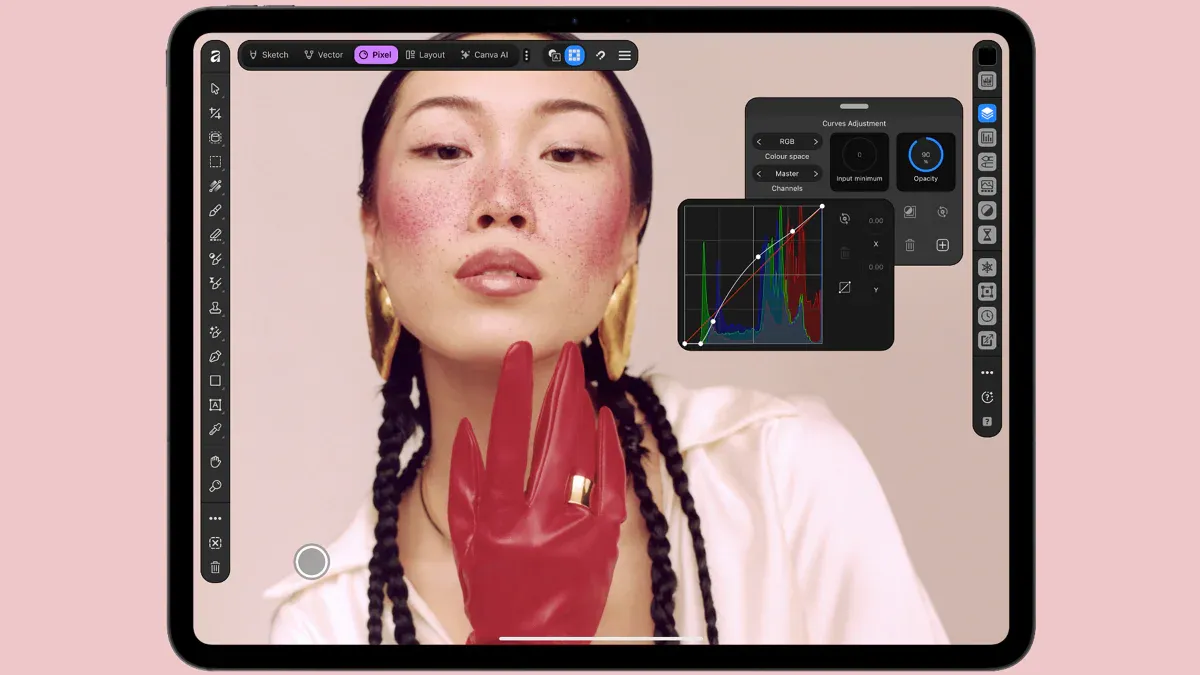 Photo: heise online
Key points
Canva released Affinity for iPad as a free all-in-one design app for individuals, with paid AI tools optional.
Canva released Affinity for iPad on 2 November, bringing its all-in-one design app to Apple's tablet with a new Sketch Studio built for touch and Apple Pencil. The app is free for individuals, requiring only a free Canva account. It combines vector graphics, photo editing, illustration, and page layout into a single interface, allowing users to start a sketch and finish a print-ready file on the iPad alone.
The release follows last year's desktop app relaunch, which merged the previously separate Affinity Designer, Photo, and Publisher apps into one for Mac and Windows. Canva had promised an iPad version in 2026, and says the desktop app has since attracted more than seven million sign-ups. The iPad version was created specifically for the touch-first interface rather than scaled down from the desktop app, according to Canva.
What the app includes
The app includes four studios: Sketch, Vector, Pixel, and Layout. Sketch Studio offers freehand drawing with a customizable brush library, and Sketch to Shapes converts hand-drawn forms into clean vector shapes. Vector tools let users build logos with real curves and precise nodes. Photo tools include RAW editing, non-destructive adjustments, and a Mask Tool that uses artificial intelligence to trace difficult edges like hair, fur, and foliage.
Layout tools support multi-page documents such as magazines, lookbooks, and photo books, with master pages and grids for consistency. Projects can go all the way to print-ready files with proper colour handling. All components of a project are saved in the same .af file, which can also be opened on desktop, so users do not need to export or convert between formats.
The interface is optimized for touch and stylus input, with Canva showing changes immediately even in large files with many layers. The app supports all advanced capabilities of Apple Pencil Pro, including pressure, tilt, barrel roll, squeeze, and hover. Hand-drawn shapes can be converted into editable vector forms, and curves and points can be adjusted with Affinity's vector tools.
Pricing and AI tools
The core sketching, vector, photo, and layout tools are free for individuals, but a free Canva account is required. The only paid features are the AI tools, which are locked behind a Canva premium plan. These include Generative Expand, image upscaling, noise reduction, and Decompose Layer, which splits a flat image into editable layers. The AI tools are available through Canva AI Studio.
A Canva Pro subscription costs 12 euros per month or 110 euros per year, according to heise online, while The Verge lists the price as starting at $18 per month. Some AI functions have monthly usage limits. The AI masking tool works locally on the device and does not count as one of the paid generative AI tools, according to heise.
The app is compatible with all major design file types, and files from older programs like Affinity Photo or Affinity Designer can be read. However, the older separate apps cannot import the new .af files. This shared file format is a key attraction, allowing users to sketch over a photo first to plan where a subject should sit, with every mask and retouch staying live and undoable.
Missing desktop features
Despite the shared file format, some desktop features are missing from the iPad version at launch. Affinity's website lists Books, Batch, Data Merge, Quick Adjustments, Info and Scope panels, macro recording, and Astrophotography Studio among the omissions, with more features planned over time. The app is available on the App Store as a free download with in-app purchases and requires iPadOS 18.0 or later.
Frequently asked questions
Is Affinity for iPad free?
Yes, the core sketch, vector, photo, and layout tools are free for individuals, but a free Canva account is required. AI tools are optional and require a Canva Pro subscription.
What features are missing from Affinity for iPad?
At launch, the iPad version omits Books, Batch, Data Merge, Quick Adjustments, Info and Scope panels, macro recording, and Astrophotography Studio, with more features planned over time.
What Apple Pencil features does Affinity for iPad support?
The app supports all advanced capabilities of Apple Pencil Pro, including pressure, tilt, barrel roll, squeeze, and hover, along with a customizable brush library.