Anthropic lets Claude users install artifacts as Mac and Windows apps
Anthropic opened a beta on 25 November 2026 that turns Claude artifacts into standalone desktop apps on Mac and Windows, with Linux unsupported at launch.
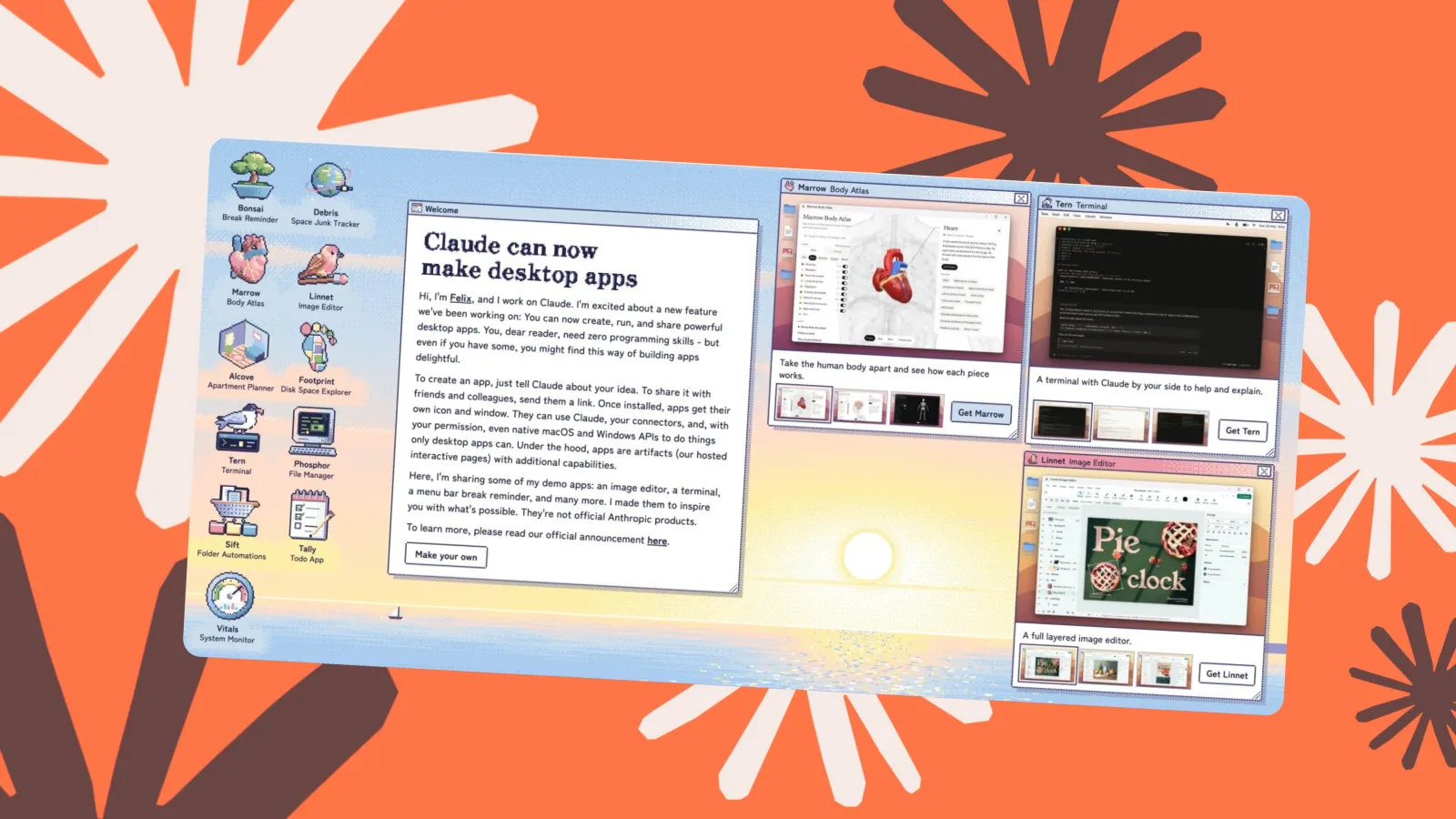 Photo: ZDNET
Key points
Anthropic released a beta that lets Claude users install artifacts as standalone desktop apps on Mac and Windows, but not on Linux.
Anthropic released a beta feature on 25 November 2026 that lets Claude users install artifacts as desktop apps on macOS and Windows. The option, called "install as app", sits in Claude's Share menu and is available on all free and paid Claude plans. Linux users cannot use it at launch.
Artifacts are the documents, designs, dashboards and interactive tools Claude builds in a panel beside a chat. Before the beta, they ran inside the Claude window or a browser. Installing one turns it into a separate program with its own icon and window, so a user can run other Claude queries while the artifact works locally, or open it without Claude at all.
How the install works
To install an artifact, a user opens it in Claude, opens the Share menu and selects "Install as app". Claude then downloads the artifact to the desktop, where the user sets permissions. The installed app updates automatically whenever the underlying artifact is edited in Claude, and each edit prompts a fresh permissions request.
Anthropic described the purpose of the feature in its own words, saying an installed artifact gets its own icon and opens in its own window instead of inside Claude. The company added that an installed app needs the user's permission before it can interact with the computer, and that it can be shared with others. Those descriptions came through ZDNET's report of the company's statements rather than a document Anthropic published itself, and the draft repeats them as reported speech.
The apps are not fully independent software. They require a signed-in Claude account and an internet connection, so they do not work offline. When an installed app calls Claude, that request counts toward the user's Claude usage limits, which are lowest on the free plan. The apps can also use any connectors the user has set up.
Permissions and the access warning
Permissions come in three levels. The default lets an app do only what it could do in a browser. App permissions add abilities such as always-on-top windows, global keyboard shortcuts, notifications and a menu bar item. Full computer access lets an app "run programs and read, change, or delete your files without asking each time", Anthropic said.
Anthropic restricts full computer access to apps the user built, or on Team and Enterprise plans, apps built by coworkers. It also warns that it does not review apps before installation: "Anthropic doesn't review apps before you install them, so only give full access to apps you trust," the company said. On Enterprise plans an administrator must switch the feature on in Organization settings.
Anthropic first released artifacts in 2024, and they became a way to standardise and repeat regular work tasks. The beta extends that pattern to the desktop: a tool used often enough now opens like other installed software. Anthropic framed the change around attention, saying a work tool "should open like the rest of your apps and remind you when something needs your attention".
What the beta excludes
Several artifact types cannot be installed as apps. Anthropic's support page lists legacy artifacts, live artifacts from Claude Cowork, and artifacts generated from templates such as Docs, Slides and Sheets. The installed apps also lack the range of apps built with Claude Code, Anthropic's separate coding tool. Anthropic published example apps to show what the feature can do, including a multi-layer image editor called Linnet, a terminal that uses the system shell, a file manager, a disk usage analyser and a system monitor. The demos run independently of the main Claude desktop tool but still cannot be used without it, a Claude account and a connection.
The beta arrives as Apple has tightened control over what apps can reach on a Mac. Apple warned that granting an app full access "puts all of the data on their Mac at risk", and said its changes aim to help users make informed decisions about their data and privacy. Installed Claude artifacts can request that same level of access.
Anthropic has not said whether Linux support will follow. The feature is in beta on the latest Windows and macOS desktop app, and the company's help centre lists Linux as unsupported at launch. Users on Linux, where Claude itself is in beta, have no date for access to install artifacts as apps.
Frequently asked questions
How do I install a Claude artifact as a desktop app?
Update Claude for Mac or Windows, open the artifact, open the Share menu and select "Install as app". The artifact downloads to your desktop, where you set permissions. The option is in beta on all free and paid plans.
Which systems can run Claude artifact apps?
macOS and Windows, through the latest Claude desktop app. Linux is not supported at launch, and Anthropic has not said whether support will come later.
Do Claude artifact apps work offline?
No. Installed artifacts need a signed-in Claude account and an internet connection, and any calls they make to Claude count toward the user's Claude usage limits.